Delightful Animations

Delightful Animations

How we introduced delight to our app by thinking about everyday micro-interactions

Client

Addi, 2024

Role

Lead Designer

Key activities

Visual Design, Motion Design, Prototyping

Part of the goal of Addi's rebrand and app redesign is to start positioning the company as an industry leader in user experience in Colombia.

The first step towards achieving that goal was to introduce micro-interaction animations in the marketplace app. This case study showcases how that was achieved.

The goal

Increase users' perception of the quality of their in-app experience

To achieve this goal, we set a 20% increase in the Usability Score as the metric to follow.

In addition to that goal, we had other secondary-level goals, more related to resetting the foundations of the work culture at Addi:

Raise the quality bar of the design team

Challenge engineers to keep going a step further

Kicking off the work

To define where to implement animations, we analyzed data to identify places with the potential for the greatest impact.

Analyzing the data revealed that we should start with user feedback for these actions:

Add to cart

the most triggered event in the app

Favorite & unfavorite

a subtle yet meaningful action.

Challenge #1

Understanding and overcoming technical constraints

This was crucial for ensuring project efficiency. The entire app's front end is built in React Native, which has limitations, especially with animations, gradients, blurs, and opacity.

After discussing with lead front-end developers, we decided to use Reanimate for animations. My task was to review its documentation to understand its capabilities and limitations.

This was crucial for ensuring project efficiency. The entire app's front end is built in React Native, which has limitations, especially with animations, gradients, blurs, and opacity.

After discussing with lead front-end developers, we decided to use Reanimate for animations. My task was to review its documentation to understand its capabilities and limitations.

This was crucial for ensuring project efficiency. The entire app's front end is built in React Native, which has limitations, especially with animations, gradients, blurs, and opacity.

After discussing with lead front-end developers, we decided to use Reanimate for animations. My task was to review its documentation to understand its capabilities and limitations.

Challenge #2

Designing the ideal micro-interaction feedback animation

Challenge #2

Designing the ideal micro-interaction feedback animation

Challenge #2

Designing the ideal micro-interaction feedback animation

When we decided to add more sophisticated animations, we had already designed some options for confirming the action of adding a product to the cart.

The second challenge was creating a micro-interaction that efficiently communicated the action's feedback, was intuitive enough without requiring a CTA for users to find their cart, simple enough not to compromise app performance, and elegant enough to enhance the perceived experience.

Simple Button Feedback

Although this idea was simple, it was too simple. It didn't tell users where to find the cart or confirm the success of their actions.

Product Floating from below the CTA

Product Floating from below the CTA

This animation taught users playfully where the product went by exiting the button and entering the cart item in the navbar. However, having the product come out of the button posed a technical challenge not worth pursuing, especially since the animation wasn't elegant enough for our standards.

This animation taught users playfully where the product went by exiting the button and entering the cart item in the navbar. However, having the product come out of the button posed a technical challenge not worth pursuing, especially since the animation wasn't elegant enough for our standards.

Combining the best of all worlds

After several rounds of feedback and iterations, we finally achieved the desired outcome: an animation that teaches users how to access their cart, playfully confirms their action's success, is technically viable, and provides comprehensive message confirmation.

Challenge #3

Ensuring the design quality before production

A recurring challenge at Addi was ensuring that features going to production were faithful to the design team's creations in the UX/UI phases.

Although we have been working on initiatives to reduce rework due to visual bug fixes, for this project, I focused on providing detailed interaction documentation for the engineers.
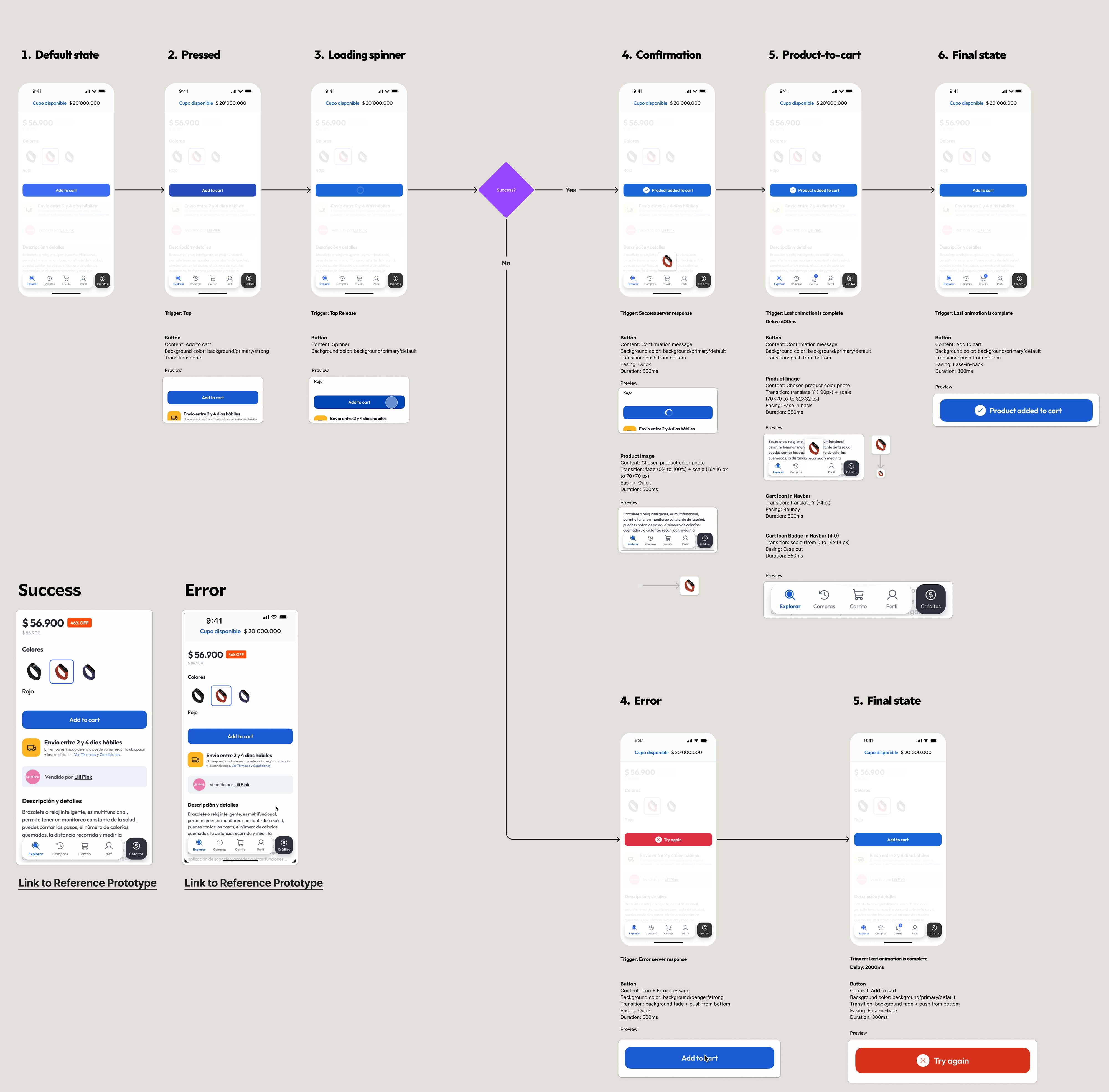
Click & drag to see more

Drag to see more

Drag to see more

The impact

We are half way there

We have achieved two of the three goals for this project. While we can't measure the impact on perceived experience quality yet, as it hasn't launched in production, the internal benefits are already evident.

The design team has elevated their quality standards, and the engineers have found the challenge of enhancing our product's overall quality both fulfilling and motivating.

The impact

We are half way there

We have achieved two of the three goals for this project. While we can't measure the impact on perceived experience quality yet, as it hasn't launched in production, the internal benefits are already evident.

The design team has elevated their quality standards, and the engineers have found the challenge of enhancing our product's overall quality both fulfilling and motivating.

The impact

We are half way there

We have achieved two of the three goals for this project. While we can't measure the impact on perceived experience quality yet, as it hasn't launched in production, the internal benefits are already evident.

The design team has elevated their quality standards, and the engineers have found the challenge of enhancing our product's overall quality both fulfilling and motivating.

Raise the quality bar of the design team

Challenge engineers to keep going a step further

Get in
touch

RUBENSCASTRO

Get in
touch

RUBENSCASTRO

Get in
touch

RUBENSCASTRO